

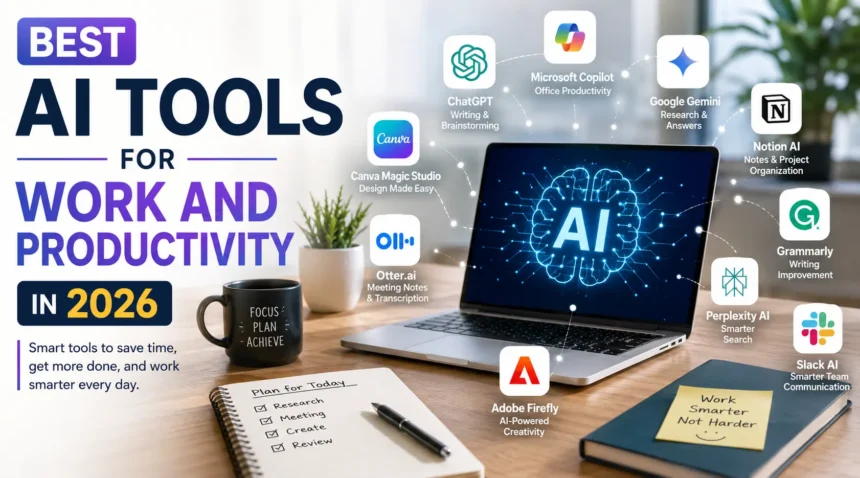
Have you ever wished you had an extra pair of hands to finish your work faster? Whether you’re writing emails, creating presentations, managing projects, or organizing your daily tasks, work can quickly become overwhelming.
That’s where AI tools are making a huge difference. In 2026, artificial intelligence is no longer just a buzzword. Iit’s becoming a part of everyday work for students, freelancers, business owners, marketers, developers, and office professionals.
If you’re wondering which ones are actually worth using, here are some of the best AI productivity tools in 2026.
List Of Best AI Tools For Work And Productivity
The best part is that these tools don’t replace people. Instead, they help you save time, reduce repetitive work, and focus on the tasks that really matter. From writing and research to meetings and design, there’s an AI tool for almost everything.
1. ChatGPT: Your Everyday AI Assistant
ChatGPT has become one of the most useful AI tools for work. It can help you write emails, summarize long documents, brainstorm ideas, create reports, explain complex topics, and even generate code. Instead of spending hours staring at a blank screen, you can simply ask ChatGPT for help. It works like having a smart assistant that’s available whenever you need it. Whether you’re a student writing assignments or a professional preparing presentations, ChatGPT can save you a lot of time.
2. Microsoft Copilot: Perfect for Office Work
If you spend most of your day using Word, Excel, PowerPoint, or Outlook, Microsoft Copilot can make your work much easier. It can create presentations from simple prompts, summarize long email threads, analyze Excel spreadsheets, and even help write documents. Instead of manually searching through data or formatting slides, Copilot handles many of these tasks in just a few seconds. For businesses already using Microsoft 365, it’s one of the most valuable AI tools available today.
3. Google Gemini: Great for Research and Everyday Tasks
Google Gemini has become a strong competitor in the AI space. It works well for researching topics, answering questions, summarizing information, and helping with writing tasks. Since it’s closely connected with Google’s ecosystem, it’s especially useful for people who rely on Gmail, Google Docs, Drive, and Search every day. Gemini is also becoming better at understanding images, files, and long conversations, making it a versatile productivity tool.
4. Notion AI: Organize Everything in One Place
Keeping notes, projects, and ideas organized isn’t always easy. That’s where Notion AI shines. It helps summarize meeting notes, rewrite content, generate task lists, organize project plans, and answer questions based on your own documents. Instead of switching between several different apps, Notion AI keeps everything together in one workspace. It’s especially useful for teams, writers, and freelancers who manage multiple projects at the same time.
5. Grammarly: More Than Just a Grammar Checker
Most people think Grammarly only fixes spelling mistakes, but it does much more than that. In 2026, Grammarly helps improve sentence structure, adjust your writing tone, rewrite paragraphs, and even suggest better ways to communicate depending on your audience. Whether you’re writing emails, reports, blog posts, or social media content, it helps make your writing clearer and more professional. It’s one of those tools that quietly improves almost everything you write.
6. Canva Magic Studio: Design Without Being a Designer
Creating professional graphics used to require design skills. Now, Canva Magic Studio makes the process much easier. You can generate presentations, social media posts, marketing graphics, posters, videos, and even edit images using simple text prompts. Small businesses, students, teachers, and content creators especially benefit because they can create attractive designs in minutes without hiring a designer.
7. Otter.ai: Never Miss Important Meeting Notes
Taking notes during meetings can be stressful. Otter.ai solves this problem by recording conversations, converting speech into text, and generating meeting summaries automatically. Instead of worrying about writing everything down, you can focus on the discussion. It’s especially useful for remote teams, online classes, interviews, and client meetings.
8. Perplexity AI: Smarter Search Results
Sometimes traditional search engines give you too many links but not enough answers. Perplexity AI takes a different approach. It provides direct answers while showing the sources it used, making research much faster and more reliable. Students, researchers, journalists, and professionals often use it when they need accurate information without opening dozens of websites.
9. Adobe Firefly: Fast Creative Content
Adobe Firefly is becoming a favorite among marketers, designers, and content creators. It helps generate images, edit photos, create text effects, and speed up creative projects using AI. Even if you don’t have advanced design skills, Firefly makes creating professional-looking content much easier than before. For anyone working with visual content, it’s a valuable addition to their workflow.
Which AI Tool Should You Choose?
The answer depends on the type of work you do. If you write often, ChatGPT and Grammarly are excellent choices. If you spend your day inside Microsoft Office, Copilot offers huge productivity benefits. Creative professionals may prefer Canva Magic Studio or Adobe Firefly, while researchers often find Perplexity AI and Google Gemini more helpful.
Many people actually combine several AI tools instead of relying on just one. For example, you might use ChatGPT for writing, Grammarly for editing, Canva for design, and Otter.ai for meetings. Using the right combination can make your daily work much faster and less stressful.
Final Thoughts
AI tools have changed the way people work, and in 2026, they’re more useful than ever. They help with writing, planning, research, design, meetings, coding, and countless other tasks that normally take hours to complete. The goal isn’t to replace your skills. It’s to help you work smarter and spend more time on creative thinking and decision-making. Whether you’re a student, freelancer, entrepreneur, or office professional, adding even one or two AI tools to your daily routine can make a noticeable difference in your productivity.
FAQ
1. What is the best AI tool for improving productivity in 2026?
A. The best AI tool depends on your needs. ChatGPT is great for writing and brainstorming, Microsoft Copilot works well with Microsoft 365, and Notion AI is ideal for organizing notes and managing projects.
2. Are AI productivity tools worth paying for?
A. Yes, if you use them regularly. Paid AI tools often offer advanced features, faster performance, and better integrations that can save hours of work each week, making them a worthwhile investment for many professionals.
3. Can AI tools replace human work?
A. No. AI tools are designed to assist rather than replace people. They handle repetitive tasks, generate ideas, and speed up workflows, while human creativity, judgment, and decision-making remain essential.