


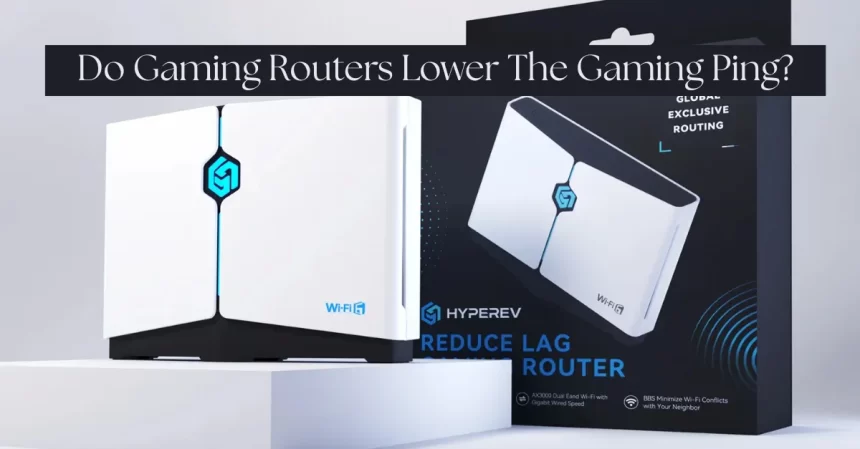
Gamers can easily get frustrated when they encounter lag and higher ping while playing their favorite game. But it has been said that gaming routers make a huge difference in the ping. Does it play a major role, or is it just a hoax?
In this blog, we will answer various questions, like how gaming routers work and what issues they actually fix.
Let’s take a closer look.
How Do Gaming Routers Actually Reduce Latency?
Solving “First Mile” Queueing Delays
When you have lots of devices connected to your network at home, it may lead to a situation where your data is queued. Thus, there may be delays between your commands and actions in your game. Fast router devices for gaming use “Quality of Service” to ensure that your gaming data receives priority. Therefore, you will enjoy speedy connectivity even when another person is downloading large files.
Optimizing Wireless Network Stability
In a crowded area, the interference on the 2.4 GHz channel can sometimes produce slight stuttering or lagging issues despite a normal ping. The gaming routers come in handy because they:
- Smart Band Switching: Focusing on the Less Congested 5 GHz/6 GHz bands
- Dynamic Channel Selection: Selecting a less occupied channel automatically, much like finding the shortest path on a route map
- Anti-Interference Algorithms: Mitigating the Impact of Interference Caused by Coexisting Wi-Fi, Bluetooth Devices
Enhancing NAT & Session Management
Gaming consoles and voice chat require a steady port mapping connection. Sometimes, in a standard router, the connection can time out when the UPnP plugin for the router is not set up in the right manner, and the gamer encounters unexpected “hiccup” intervals in the gaming experience. Gaming routers correct this in the following ways:
- Precise Port Control ensures that all required ports for the gaming experience are open.
- Device Priority Binding: Allocation of fixed IPs & guaranteed bandwidths to gaming devices.
In summary, a gaming router acts like a network administrator for your home network. The router decides which devices or applications are given priority, directs data traffic flow, and ensures that your devices do not compete for internet connectivity.
The Use Limitations of Traditional Gaming Routers
As noted, gaming routers are good for handling your home network but cannot handle how data is treated once it leaves your house. To understand why, let me explain how network traffic travels in simplified terms:
- Your Device → Router (Home Network)
- Your gaming PC or console sends data, like “shoot now!” commands, to your router. The router manages your home Wi-Fi or wired connection.
- The router’s job is to put gaming traffic ahead of other devices, like phones or TVs, to help reduce lag at home.
- Router → Internet (Public Network)
- The router then sends your data to your Internet Service Provider (ISP), which is the company you pay for internet access, like Comcast or Verizon.
- Internet → Game Server
- Finally, your data reaches the game’s server, which is the computer hosting your match.
- The server processes your action (e.g., registering a hit) and sends a reply back the same way.
The key to gaming latency reduction often is the wider internet, which is beyond routers and players. ISPs do decide how your data travels. As such, changing the settings of your router will not impact this in any way. For that reason, despite having high-ended gaming routers and all settings apt, some players get lag during their game. HYPEREV: Specially designed to reduce gaming latency.
What HYPEREV Does Differently

HYPEREV is optimized for the elimination of lag during gaming. HYPEREV acts as a router and features “intelligent routing on over 7,500 nodes around the world.” HYPEREV analyzes your network and your gaming server and automatically changes the route “in real time.” HYPEREV ensures that your connection remains steady and your ping low, ensuring quick actions from your character.
Compared to traditional routers, HYPEREV offers additional advantages:
- Plug-and-play: Whether you’re using an ordinary plug-and-play HYPEREV, it works with any router, regular or gaming, and can quickly optimize your network. regions, keeping your ping steady and consistent during competitive matches.
- One-click boost: You can improve your connection in just 20 seconds, with no tech skills required.
To recap, a gaming router helps in your home network, but only HYPEREV solves problems on the public internet where most lag occurs in gaming. That’s faster performance regardless of where your lag problems originate.
Final
So, to answer the question: Does a gaming router lower the ping? Yes, they do. But it totally depends on the location of the higher ping. If the home router is crowded, the gaming router will come to the rescue. But mostly the lags are connected to public wifi. And that’s where HYPEREV steps in like a superhero. You can try this tool, which is specially designed to lower the gaming ping. You can visit GearUp for a more detailed concept.
FAQs
Q1. Does a gaming router make ping slower?
Ans: The answer to the question of whether gaming routers can lower ping is unquestionably yes, but it depends on where your high ping comes from.
Q2. How can I play games with a reduced ping?
Ans: Think of this as your go-to resource for minimizing latency and ping in video games.
- Test the speed of your internet.
- Give your machine a restart.
- Perform computer upkeep.
- Examine your router.
- Shut down background apps and programs.
- Set up automatic updates.
- Make use of an Ethernet wire.
- Take gadgets off of your network.
Q3. Is it worthwhile to purchase a gaming router?
Ans: A gaming router is the ideal choice for avid online gamers, professional gamers, or those with several gaming devices. A good gaming router’s features and improvements usually result in more dependable and seamless gaming.
Q4. Which is better for pinging: Ethernet or WiFi?
Ans: In general, wired Ethernet connections are faster and have lower latency than WiFi connections, making them superior for gaming on PCs and consoles.
Q5. Is it possible for a VPN to reduce ping?
Ans: VPNs can be useful in several circumstances even though they aren’t specifically made to increase ping: Rerouting Data: By offering a more direct path between your device and the game server, VPNs help reduce ping. Using a VPN could reduce latency if your ISP’s routing is ineffective.