

Choosing a VPN server can feel more complicated than it really is. You open the server list, see different countries and locations, and suddenly start wondering which one will give you good speed without affecting your privacy.
The good thing is that you do not always have to choose a server manually. Proton VPN can automatically connect you to a suitable server based on your location, while its different server options allow you to choose a connection according to what you actually need.
Whether you are browsing on public Wi-Fi, working remotely, streaming, gaming, or simply looking for more privacy online, choosing the right server can make a difference. Here is how to find the right balance between speed and privacy.
What Should You Look For When Choosing A Proton VPN Server?
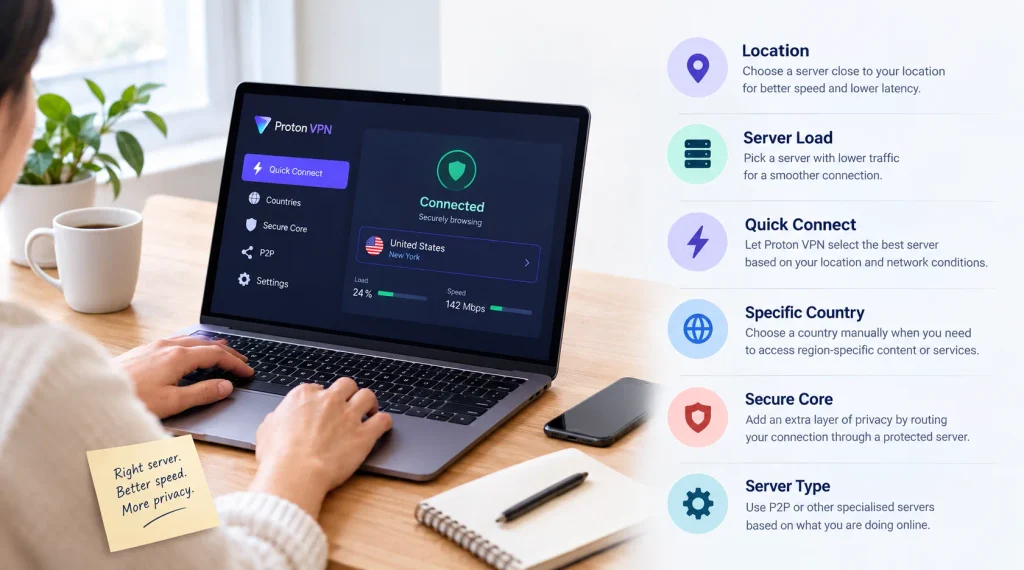
The best Proton VPN server is not necessarily the one in the country you think is most suitable. Your location, server load, distance, internet connection, and what you are doing online can all affect the experience. For everyday browsing, a nearby server with a reasonable load is usually a good place to start. If privacy is your main concern, you may want to consider some of Proton VPN’s specialised privacy features instead. Understanding what each option does makes the decision much easier.
1. Start With The Closest Proton VPN Server
Distance is one of the easiest things to consider when choosing a VPN server. Generally, the closer a VPN server is to your physical location, the shorter the distance your data needs to travel. This can help reduce latency and maintain better connection speeds. It can be especially noticeable when you are making video calls, browsing websites, gaming, or downloading files.
For example, someone in India would generally have a better starting point with a nearby Proton VPN server rather than immediately connecting to a server on another continent. However, distance is not the only factor that matters. A nearby server with heavy traffic may perform worse than a slightly more distant server with lower usage.
2. Check The Server Load Before Connecting
Server load is another important factor that is easy to overlook. A VPN server is used by many people at the same time, and a heavily loaded server can sometimes affect connection performance. Proton VPN shows server load information, making it easier to compare available servers. If one server appears heavily loaded, trying another server in the same country could give you a better connection. You do not necessarily need to jump from one country to another. Sometimes, switching to another nearby server is all it takes to improve your experience.
3. Let Proton VPN Choose A Server For You
If you do not want to spend time comparing servers, Proton VPN’s Quick Connect option can do the work for you. It automatically selects a suitable server based on factors such as your location and server conditions.
This is particularly useful when you are using a VPN for normal day-to-day activities. If you are checking emails, browsing websites, shopping online, using social media, or connecting to public Wi-Fi, there may be little reason to manually search through different servers. Quick Connect is also a convenient starting point. If the connection does not perform well, you can always disconnect and try another server manually.
4. Choose A Specific Country When Location Matters
There are times when speed is not your only concern. You may specifically need to connect through a particular country, especially when travelling or testing how websites and online services appear from another region.
In these situations, you can select a country manually and then choose an available server within that location. Keep in mind that connecting to a distant country can affect your speed because your data has to travel a longer distance. If you do not have a specific reason for selecting a distant location, a nearby server will generally be a more practical choice for everyday use.
5. Use Secure Core When Privacy Comes First
Speed is important, but it is not always the main priority. If you are particularly concerned about privacy, Proton VPN’s Secure Core feature is worth considering. Secure Core routes your connection through a specially protected Proton VPN server before sending it through another VPN server. Proton VPN operates these Secure Core servers in Switzerland, Sweden, and Iceland.
The additional routing is designed to provide another layer of protection against certain network-based attacks. However, there is a trade-off. Sending your traffic through more than one server can add extra distance and may affect connection speed. For regular browsing, a nearby standard server may be enough. If you have a stronger privacy requirement, Secure Core can provide an additional layer of protection.
6. Pick The Server Based On What You Are Doing
There is no single Proton VPN server that is perfect for every activity. Your choice should depend on what you are actually doing online. If you are browsing or checking emails, a nearby standard server is usually sufficient. If you are concerned about privacy on an unfamiliar network, you may want to pay more attention to Proton VPN’s privacy-focused features.
For activities involving file sharing, Proton VPN also has servers that support P2P connections. Choosing a server designed for your particular use case can be more useful than simply picking a country at random. The idea is simple: do not choose a specialised server just because it sounds more advanced. Choose it when its particular feature actually matches your needs.
7. Consider VPN Accelerator For Better Performance
A common concern with VPNs is that encryption and longer connections can reduce internet speed. Proton VPN has a feature called VPN Accelerator that is designed to improve VPN performance, particularly when dealing with longer-distance connections or certain network conditions.
However, it does not mean you should automatically choose a server thousands of kilometres away. Distance can still have an effect on latency and overall performance. For the best results, start with a nearby server. If you need to connect to a distant location, VPN Accelerator may help improve the experience.
8. Keep The Kill Switch In Mind
Choosing a good server is only one part of keeping your connection private. Proton VPN also offers a kill switch that can help protect your traffic if the VPN connection unexpectedly drops. Without a kill switch, your device may switch back to its normal internet connection if the VPN disconnects. Depending on what you are doing, that could expose your regular IP address. This feature can be particularly useful when you are connected to public Wi-Fi at hotels, airports, cafés, or other places where the network may not always be reliable.
9. Test Different Servers When Your Connection Feels Slow
There is no permanent answer to the question of which Proton VPN server is the fastest. Internet conditions change, server loads change, and your own connection can also vary throughout the day. If your current server feels slow, start by trying another server in the same country. If that does not help, try a nearby country and compare the experience.
It is also worth remembering that the server itself may not always be responsible for slow speeds. Your internet provider, Wi-Fi connection, device, network congestion, or the website you are accessing can also affect performance. A little trial and error is often the easiest way to find a server that works well for you.
10. Proton VPN Free And Paid Users Have Different Options
Your choice of servers also depends on which Proton VPN plan you use. Free users have access to a smaller selection of server locations and are initially connected to the fastest available free server for their location. Free users can change servers, although the next server is selected randomly and there are limits on how frequently they can switch.
Paid Proton VPN plans provide access to a larger server network and additional options, including specialised servers and Secure Core connections. This gives users more control when they need a particular location or privacy feature.
Final Thoughts
Choosing a Proton VPN server does not need to be complicated. For most everyday activities, starting with the closest available server or using Quick Connect is a simple approach. If the connection feels slow, check the server load and try another nearby option. When privacy is more important than speed, features such as Secure Core can provide additional protection. The key is to choose a server based on what you actually need rather than assuming that the farthest or most specialised server is automatically better. Once you understand how distance, server load, location, and privacy features affect your connection, finding the right Proton VPN server becomes much easier.
For more VPN details, make sure to check out this website.
FAQs
Q. Which Proton VPN server is best for speed?
A. For most users, a nearby server with a relatively low load is a good starting point. Proton VPN’s Quick Connect feature can also automatically select a suitable server based on factors such as your location and network conditions.
Q. Does choosing a nearby Proton VPN server make the connection faster?
A. Usually, a nearby server can provide lower latency because your data has less distance to travel. However, server load and your own internet connection also affect performance, so the closest server is not always guaranteed to be the fastest.
Q. Should I use Proton VPN Secure Core all the time?
A. It depends on what matters most to you. Secure Core provides an additional layer of privacy by routing your connection through a protected server before it reaches the final VPN server. However, the additional routing can affect speed. For everyday browsing, a nearby standard server may be sufficient, while Secure Core can be considered when stronger privacy protection is a priority.